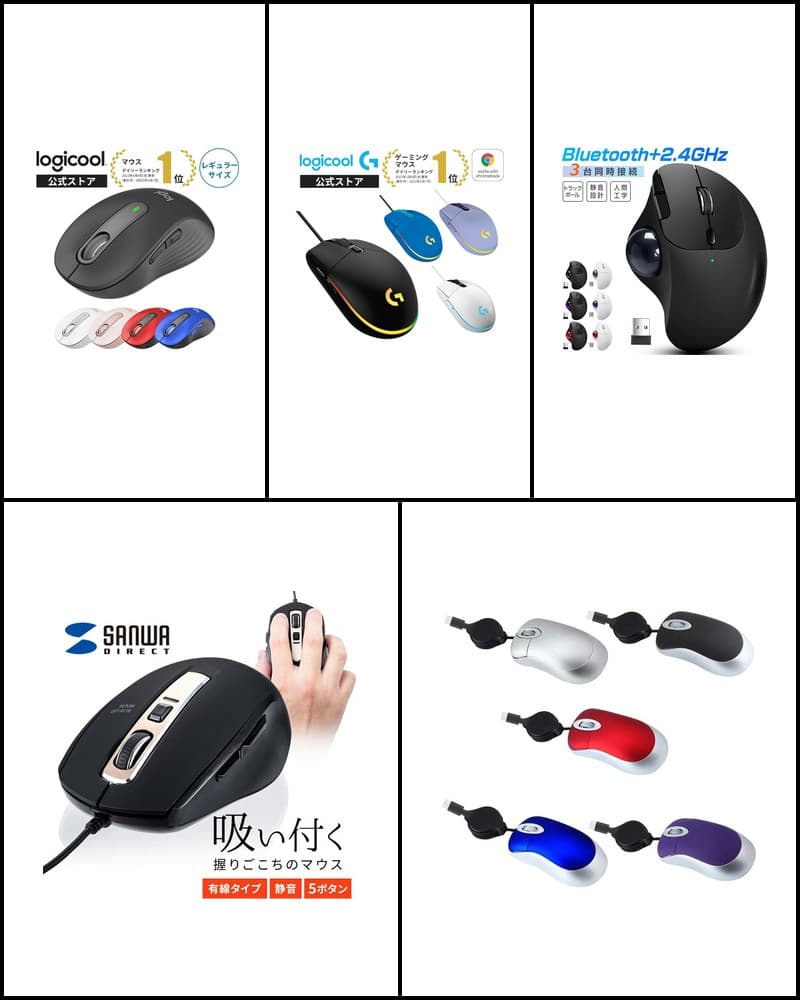
A wired mouse connects to your computer with a cable, so there is no charging or battery replacement, and no wireless setup such as Bluetooth pairing or preparing a receiver. Its main appeal is a simple connection: plug it into a USB port and start using it. On the other hand, you need to think about cable routing on your desk, and it can be bulkier to carry. This article selects 5 wired mice covered on R13 Picks with non-overlapping uses—silent, 5-button, gaming, simple, and compact—and organizes them with a comparison table and use-case recommendations. It is not a ranking but a comparison to help you choose the right USB mouse.
Models in this guide

Logicool G203 LIGHTSYNC
Gaming
Check price on the store page
Read more
Sanwa Direct 400-MA124BK
Silent / 5 buttons
Check price on the store page
Read more
ELECOM EX-G M-XGL30UBSKABK
Silent / L size / 5 buttons
Check price on the store page
Read more
ELECOM EPRIM M-Y8UBBK
Simple / 3 buttons
Check price on the store page
Read more
PCASTORE Retractable Mini Mouse
Compact / portable
Check price on the store page
Read more*Prices are not listed because they change often. Check the store page for the latest price and stock.
5 wired mice comparison
| Product | Connector | Buttons | DPI | Silent | Weight | Cable length | Features | Best for |
|---|---|---|---|---|---|---|---|---|
| Logicool G203 LIGHTSYNC | USB | 6 (programmable) | 200–8,000dpi (up to 5 levels) | — | 85g (mouse only) | 2,100mm | LIGHTSYNC RGB, 1000Hz report rate | Gaming |
| Sanwa Direct 400-MA124BK | USB Type-A | 5 | 800 / 1200 / 1600 / 2000 | Silent buttons (left/right clicks, side buttons) | Approx. 85.2g | Approx. 1.5m | Blue LED, 4-level DPI switching | Silent / office |
| ELECOM EX-G M-XGL30UBSKABK | USB-A | 5 (incl. wheel button) | 2000DPI | Silent model (manufacturer official) | Approx. 115g (incl. cable) | Approx. 1.5m | BlueLED, L size, button assignment | Silent / larger mouse |
| ELECOM EPRIM M-Y8UBBK | USB Type-A | 3 (incl. wheel button) | 1600dpi | — | Approx. 66.5g | Approx. 1.5m | BlueLED, M size, symmetrical | Simple office use |
| PCASTORE Retractable Mini Mouse | Type-C or USB-A (choose when buying) | — | 1000DPI | — | — | Approx. 70–80cm (retractable) | Compact design of approx. 4.5 × 2.5 × 7.5cm | Portable / compact |
Logicool G203 LIGHTSYNC
- Connector
- USB
- Buttons
- 6 (programmable)
- DPI
- 200–8,000dpi (up to 5 levels)
- Silent
- —
- Weight
- 85g (mouse only)
- Cable length
- 2,100mm
- Features
- LIGHTSYNC RGB, 1000Hz report rate
- Best for
- Gaming
Sanwa Direct 400-MA124BK
- Connector
- USB Type-A
- Buttons
- 5
- DPI
- 800 / 1200 / 1600 / 2000
- Silent
- Silent buttons (left/right clicks, side buttons)
- Weight
- Approx. 85.2g
- Cable length
- Approx. 1.5m
- Features
- Blue LED, 4-level DPI switching
- Best for
- Silent / office
ELECOM EX-G M-XGL30UBSKABK
- Connector
- USB-A
- Buttons
- 5 (incl. wheel button)
- DPI
- 2000DPI
- Silent
- Silent model (manufacturer official)
- Weight
- Approx. 115g (incl. cable)
- Cable length
- Approx. 1.5m
- Features
- BlueLED, L size, button assignment
- Best for
- Silent / larger mouse
ELECOM EPRIM M-Y8UBBK
- Connector
- USB Type-A
- Buttons
- 3 (incl. wheel button)
- DPI
- 1600dpi
- Silent
- —
- Weight
- Approx. 66.5g
- Cable length
- Approx. 1.5m
- Features
- BlueLED, M size, symmetrical
- Best for
- Simple office use
PCASTORE Retractable Mini Mouse
- Connector
- Type-C or USB-A (choose when buying)
- Buttons
- —
- DPI
- 1000DPI
- Silent
- —
- Weight
- —
- Cable length
- Approx. 70–80cm (retractable)
- Features
- Compact design of approx. 4.5 × 2.5 × 7.5cm
- Best for
- Portable / compact
For gaming
For a wired gaming mouse, the Logicool G203 LIGHTSYNC is a candidate. You can set sensitivity from 200 to 8,000 dpi and switch up to 5 levels with a button. Functions can be assigned to its 6 buttons with Logicool G HUB, the USB report rate is 1000Hz (1ms), and it supports LIGHTSYNC RGB lighting with about 16.8 million colors.
If quietness matters
To reduce click noise, two models with silent specifications are candidates. The Sanwa Direct 400-MA124BK is a 5-button wired mouse with silent buttons for the left/right clicks and side buttons, and its DPI switches in 4 levels. The ELECOM EX-G M-XGL30UBSKABK is an L-size, 5-button model introduced as a silent model by the manufacturer. You can choose based on your hand size and weight preference.
For simple office use
For office work centered on clicking and scrolling, a simple 3-button model like the ELECOM EPRIM M-Y8UBBK is an option. It connects via USB Type-A and offers BlueLED, 1600dpi, and an M-size, symmetrical design at approx. 66.5g. It has no back/forward buttons or DPI switching, so it suits people who want simple operation.
For portability and compact models
If you carry a laptop, there is the PCASTORE retractable mini mouse. The body is a compact approx. 4.5 × 2.5 × 7.5cm, and the approx. 70–80cm cable retracts for storage. It comes in Type-C and USB-A versions, so choosing the Type-C version lets you connect directly even to laptops without a USB-A port.
How to choose a wired mouse
USB-A and Type-C
When choosing a wired mouse, first check the connector. Many USB mice use a USB-A (USB Type-A) connector, but some recent laptops have no USB-A port. In that case, choose a Type-C mouse or prepare an adapter. Among these 5 models, the PCASTORE mini mouse is available in a Type-C version.
Number of buttons
A 3-button layout with left/right clicks and a wheel is simple and easy to use. A 5-button wired mouse with back/forward side buttons is worth checking for office work that involves browsing or moving between documents. Some gaming mice let you assign functions to buttons. Side buttons do not work on Mac with some models, so also check your OS.
Silent
Silent mice use buttons designed to reduce click noise. Whether only the left/right clicks or also the side buttons are quiet differs by model. Click noise does not disappear completely, so treat it as a guide for quiet places such as offices or at night.
DPI
DPI indicates how far the cursor moves when you move the mouse. Higher values move the cursor farther with less movement. Models with DPI switching can be adjusted to your screen size and work. Models without DPI switching suit people who want simple use without settings.
Size
Mouse size affects how well it fits your hand and grip. Larger L-size models are easier to support with your whole palm, while M-size and compact models are easier to handle and carry. Checking the body dimensions before buying helps reduce gaps from what you expect.
Weight
Weight affects how the mouse feels when you move it. Lighter models move easily, while models with some weight suit people who prefer stability. Weight figures differ by manufacturer depending on whether the cable is included, so check the conditions when comparing.
Cable length
Choose cable length based on where your computer and mouse are. A longer cable is easier when your desktop PC sits under the desk, while a short or retractable cable helps keep your desk tidy when using it right next to a laptop. These 5 models range from an approx. 70–80cm retractable cable to 2,100mm.
Gaming vs. everyday use
Wired gaming mice offer features for in-game control and customization, such as a wide DPI range, button assignment, report rate, and lighting. Everyday models tend to focus on aspects of daily work such as quietness, button layout, and size. Choosing a model aimed at your use makes comparison easier.
Product details
Logicool G203 LIGHTSYNC
A USB wired gaming mouse with a sensor up to 8,000 DPI, 6 buttons, and LIGHTSYNC RGB.
Check price on the store page
Key features
- 200–8,000dpi with up to 5 sensitivity levels switched by button
- 6 programmable buttons, 1000Hz (1ms) USB report rate
- LIGHTSYNC RGB with about 16.8 million colors, 85g (mouse only), 2,100mm cable
Recommended for
- People looking for their first wired gaming mouse
- People who want to customize button assignments and lighting
Notes
- Logicool G HUB is required for detailed settings
- Wired connection only; cannot be used wirelessly
Sanwa Direct 400-MA124BK
A USB wired mouse with silent buttons, back/forward buttons, and 4-level DPI.
Check price on the store page
Key features
- Wired mouse connecting via USB Type-A (approx. 1.5m cable)
- 5-button layout with silent buttons for the left/right clicks and side buttons
- 4-level switching at 800 / 1200 / 1600 / 2000 count/inch, approx. 85.2g
Recommended for
- People looking for a silent 5-button wired mouse
- People who want to use it for work without worrying about batteries or charging
Notes
- On Mac, the side buttons cannot be used and pressing the wheel button is not supported
ELECOM EX-G M-XGL30UBSKABK
An L-size silent wired mouse from the EX-G series with a BlueLED sensor and 5 buttons.
Check price on the store page
Key features
- Wired mouse connecting via USB-A (approx. 1.5m cable), introduced as a silent model by the manufacturer
- BlueLED, 2000DPI, 5 buttons including the wheel button
- L size, approx. 115g (incl. cable), button assignment via ELECOM Mouse Assistant
Recommended for
- People looking for a larger L-size wired mouse
- People who want a silent 5-button mouse
Notes
- Even as a silent model, click noise does not disappear completely
- Not aimed in the same direction as gaming-focused models
ELECOM EPRIM M-Y8UBBK
A simple USB wired mouse with BlueLED, 1600dpi, and 3 buttons in an M-size, symmetrical design.
Check price on the store page
Key features
- Wired mouse connecting via USB Type-A (approx. 1.5m cable)
- Optical sensor with BlueLED, 1600dpi resolution
- 3 buttons including the wheel button, M size at approx. 66.5g, symmetrical design
Recommended for
- People looking for a simple office mouse where 3 buttons are enough
- People who want a light, symmetrical mouse
Notes
- No side buttons such as back/forward and no DPI switching
- The store page lists multiple colors together, so select black when buying
PCASTORE Retractable Mini Mouse
A compact wired mouse with a retractable cable, available in Type-C and USB-A versions.
Check price on the store page
Key features
- Wired connection, available in Type-C and USB-A versions
- Retractable cable of about 70–80cm
- Compact design of about 4.5 × 2.5 × 7.5cm, optical, 1000DPI
Recommended for
- People looking for a compact wired mouse to carry with a laptop
- People looking for a Type-C mouse
Notes
- Type-C and USB-A versions are separate, so check the connector when buying
- Weight, number of buttons, and warranty period could not be confirmed on the store page
Not sure which to choose?
- For gaming → Logicool G203 LIGHTSYNC
- For silent and 5 buttons in a standard size → Sanwa Direct 400-MA124BK
- For silent and 5 buttons in a larger L size → ELECOM EX-G M-XGL30UBSKABK
- For a simple 3-button office mouse → ELECOM EPRIM M-Y8UBBK
- For portability or Type-C connection → PCASTORE Retractable Mini Mouse
Summary
Wired mice need no charging or battery replacement and work simply by plugging into a USB port. The right model depends on your use: G203 for gaming, 400-MA124BK or EX-G for silent 5-button use, EPRIM for simple office work, and the PCASTORE mini mouse for portability or Type-C connection. To compare wireless and trackball models too, see the related "10 recommended mice" guide. Check each product article for detailed specs, and the store page for the latest price and stock.