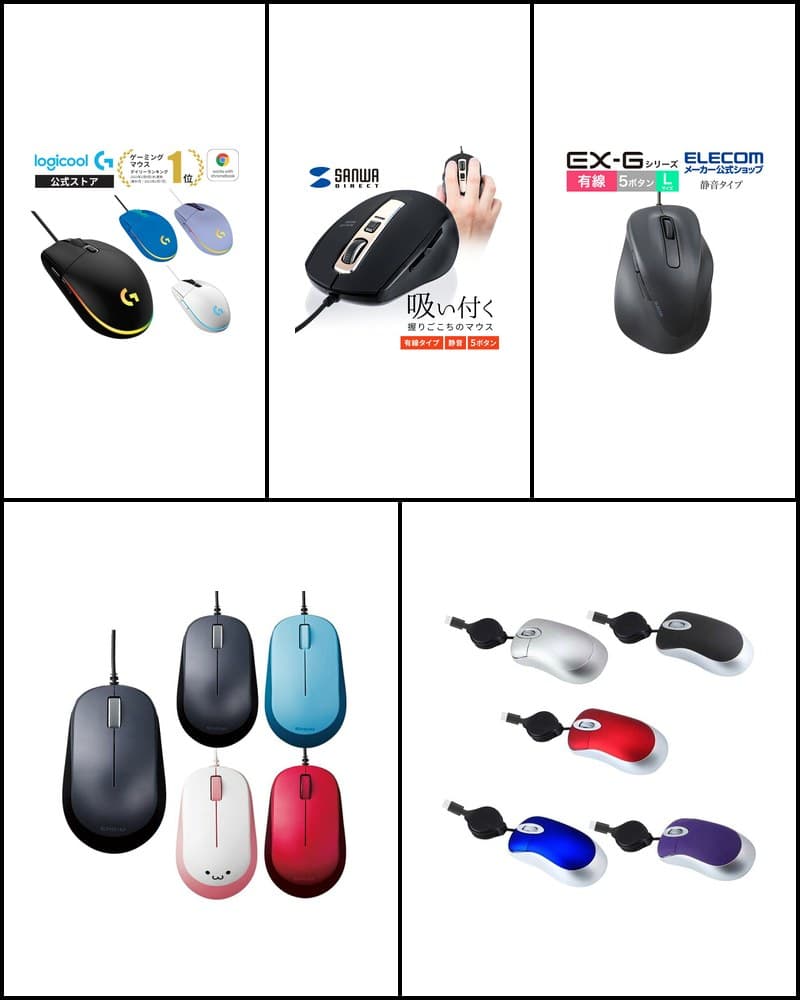
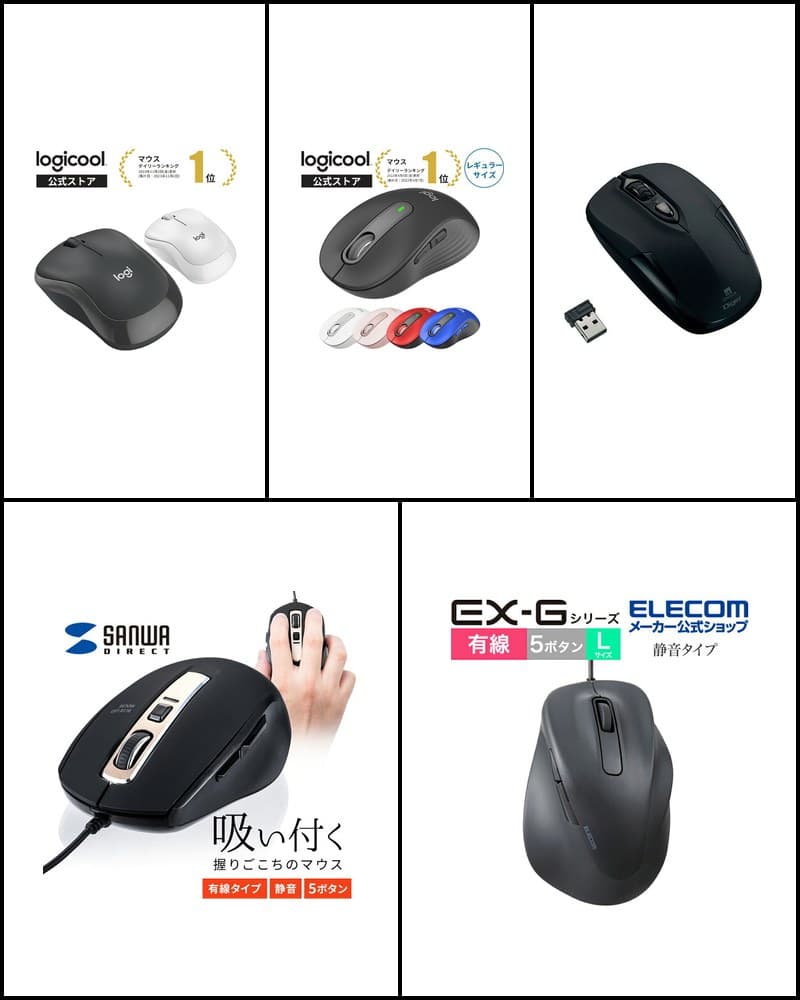
Mice suit different uses depending on connection type, quietness, number of buttons, and shape. The right type depends on whether you want a stable cable connection, a cleaner wireless desk, quieter clicks, or a mouse for gaming. This article selects 10 models from the mice covered on R13 Picks, chosen so their uses don't overlap too much, and compares them by type: wired, wireless, silent, trackball, and more. It is not a ranking but a guide to help you decide which type to choose.
Models in this guide

Logicool Signature M650
Work / everyday / quiet
Check price on the store page
Read more
Logicool M240 Silent Bluetooth Mouse
Quiet / Bluetooth / portable
Check price on the store page
Read more
Sanwa Direct 400-MAWBT207
Multi-function / wireless
Check price on the store page
Read more
Sanwa Direct 400-MA097
Work / everyday / 5 buttons
Check price on the store page
Read more
Nakabayashi Digio2 MUS-RIT126BK
Quiet / simple
Check price on the store page
Read more
BLENCK Q23
Quiet / thin / rechargeable
Check price on the store page
Read more
Sanwa Direct 400-MA124BK
Wired / quiet / 5 buttons
Check price on the store page
Read more
Logicool G203 LIGHTSYNC
Gaming / wired
Check price on the store page
Read more
EWINE-type Trackball Mouse
Trackball / multi-device
Check price on the store page
Read more
PCASTORE Retractable Mini Mouse
Portable / wired
Check price on the store page
Read more*Prices are not listed because they change often. Check the store page for the latest price and stock.
How to choose a mouse
Wired vs. wireless
A wired mouse connects to your computer with a cable, so there are no batteries to replace or charge. A wireless mouse keeps your desk tidier without a cable and suits carrying with a laptop, but you need to manage power depending on whether it uses batteries or is rechargeable. As a basic rule, choose wired for a fixed desk, and wireless if you want fewer cables or plan to carry it.
Bluetooth vs. 2.4GHz receiver
Wireless mice mainly connect via Bluetooth or 2.4GHz using a USB receiver. Bluetooth mice need no receiver and don't occupy a USB port, but the device must support Bluetooth. 2.4GHz models use a receiver plugged into a USB port, so the device needs a USB Type-A port. Models that support both can be used to match each device.
Silent mice
Silent mice use switches designed to reduce click noise. Manufacturers describe this differently, such as "90% quieter than a previous model," and whether only the left/right clicks or also the wheel and side buttons are quiet differs by model. None are completely silent, so treat this as a guide for using a mouse in quiet places.
DPI
DPI (count) indicates how far the cursor moves when you move the mouse. Higher values move the cursor farther with less hand movement. Models with DPI switching can be adjusted to your work or screen size. Many everyday mice are around 1000–1600, while gaming mice often allow a wider range.
Number of buttons
A 3-button mouse with left/right clicks and a wheel is simple and easy to use. Models with around 5 buttons including back/forward are worth checking for browsing or work that involves moving back and forth between pages. Models with more buttons that can be assigned commands or macros are aimed at gaming or specific tasks. Note that side buttons do not work on Mac with some models, so check your environment.
Size and weight
For carrying, small and light models or those that store the receiver inside the body are easier to choose. For long hours at a desk, also check whether the size fits your hand. Weight figures differ depending on whether batteries or cables are included, so check the conditions when comparing.
Trackballs
A trackball mouse moves the cursor by rolling a ball without moving the body. It fits desks with limited space for moving a mouse, but the feel differs from a regular mouse, so it may take time to get used to if it's your first one.
Work mice vs. gaming mice
Work mice tend to focus on features for everyday tasks, such as quietness, easy connection, and scrolling. Gaming mice offer features for in-game control and customization, such as a wide DPI range, programmable buttons, and lighting. If your purpose is clear, choosing a model aimed in that direction makes comparison easier.
Recommended for work and everyday use
For everyday work, choosing by connection type and scrolling features is a good approach. The Logicool Signature M650 offers dual Logi Bolt and Bluetooth connection plus SmartWheel, and the Sanwa Direct 400-MAWBT207 has a side wheel that helps with wide spreadsheets. The 400-MA097 is also an option if you want a 2.4GHz model with back/forward buttons.
Recommended if quietness matters
To reduce click noise, choose from models with silent switches or a silent design. The Logicool M650 and M240 are both described as having 90% quieter clicks than the M170, the Nakabayashi MUS-RIT126BK uses silent switches for the left/right and wheel buttons, and the Sanwa Direct 400-MA124BK uses silent buttons for the left/right clicks and side buttons. To compare silent models only, see the 5 best silent mice guide as well.
Recommended if you want wireless
If you want to connect without a receiver, choose a Bluetooth model; if you just want to plug into a USB port, a 2.4GHz model is easier. Models that support both can switch to match each device. Power options split into battery-powered models such as the M240 and MUS-RIT126BK, and rechargeable ones such as the Q23 and 400-MAWBT207.
Recommended if you want wired
If you don't want to think about batteries or charging, choose a wired model. The Sanwa Direct 400-MA124BK has silent buttons and 5 buttons, while the Logicool G203 has 6 gaming-oriented buttons and RGB lighting. For carrying, there is also the PCASTORE mini mouse with a retractable cable. To compare wired models only, see the 5 best wired mice guide as well.
Recommended for gaming
For a gaming mouse, the Logicool G203 LIGHTSYNC is a candidate. It lets you set sensitivity from 200 to 8,000 dpi and has 6 programmable buttons, a 1000Hz USB report rate, and LIGHTSYNC RGB. Detailed button assignment and lighting settings use Logicool G HUB.
Recommended if you want to try a trackball
If you want to operate without moving the body, there is the EWINE-type thumb trackball mouse. It supports 2.4GHz and Bluetooth, connects up to 3 devices, and offers 5 DPI levels and 7 buttons. Since the feel differs from a regular mouse, allow some time to get used to it if it's your first.
Recommended for portability
If you carry a laptop, size and receiver handling are key points. The PCASTORE mini mouse has a compact body of about 7.5cm and a retractable cable, the Logicool M240 weighs 73.8g (with battery) and needs no receiver, and the BLENCK Q23 is thin and stores its receiver on the back.
10-model comparison
| Product | Connection | Wired / Wireless | Bluetooth | DPI | Buttons | Silent | Weight | Features | Best for |
|---|---|---|---|---|---|---|---|---|---|
| Logicool Signature M650 | Logi Bolt USB receiver / Bluetooth Low Energy | Wireless | Yes | 400–4,000dpi | 5 (incl. tilt) | SilentTouch (90% quieter vs. M170) | 101.2g (with battery) | SmartWheel | Work / everyday use |
| Logicool M240 Silent Bluetooth Mouse | Bluetooth (no receiver) | Wireless | Yes | 1000dpi | 3 | 90% quieter vs. M170 | 73.8g (with battery) | Symmetrical, lightweight | Quiet / portable |
| Sanwa Direct 400-MAWBT207 | Bluetooth 5.1 / 2.4GHz | Wireless | Yes | 1000 / 1600 / 2400 / 3200 | — | Silent buttons | Approx. 108g | Side wheel, high-speed scroll, rechargeable | Multi-function / spreadsheets |
| Sanwa Direct 400-MA097 | 2.4GHz | Wireless | — | 800 / 1200 / 1600 | 5 | — | Approx. 67g (without battery) | Back/forward buttons, BlueLED | Work / everyday use |
| Nakabayashi Digio2 MUS-RIT126BK | 2.4GHz (USB receiver) | Wireless | No | 800 / 1200 / 1600 | 3 | Silent switches (left/right, wheel) | Approx. 62g (without receiver and battery) | Receiver storage, 1 AA battery | Quiet / simple |
| BLENCK Q23 | 2.4GHz (USB receiver) | Wireless | No | — | — | Silent design (per seller) | — | Thin, USB rechargeable | Quiet / portable |
| Sanwa Direct 400-MA124BK | USB Type-A | Wired | No | 800 / 1200 / 1600 / 2000 | 5 | Silent buttons (left/right clicks, side) | Approx. 85.2g | Approx. 1.5m cable, blue LED | Wired / quiet |
| Logicool G203 LIGHTSYNC | USB | Wired | — | 200–8,000dpi | 6 | — | 85g (mouse only) | LIGHTSYNC RGB, 1000Hz | Gaming |
| EWINE-type Trackball Mouse | 2.4GHz / Bluetooth 5.0・3.0 | Wireless | Yes | 200 / 400 / 800 / 1200 / 1600 | 7 | Silent design | Approx. 125.5g | Thumb trackball, 3-device connection | Trackball |
| PCASTORE Retractable Mini Mouse | Type-C or USB-A (choose when buying) | Wired | — | 1000DPI | — | — | — | Retractable cable, approx. 7.5cm | Portability |
Logicool Signature M650
- Connection
- Logi Bolt USB receiver / Bluetooth Low Energy
- Wired / Wireless
- Wireless
- Bluetooth
- Yes
- DPI
- 400–4,000dpi
- Buttons
- 5 (incl. tilt)
- Silent
- SilentTouch (90% quieter vs. M170)
- Weight
- 101.2g (with battery)
- Features
- SmartWheel
- Best for
- Work / everyday use
Logicool M240 Silent Bluetooth Mouse
- Connection
- Bluetooth (no receiver)
- Wired / Wireless
- Wireless
- Bluetooth
- Yes
- DPI
- 1000dpi
- Buttons
- 3
- Silent
- 90% quieter vs. M170
- Weight
- 73.8g (with battery)
- Features
- Symmetrical, lightweight
- Best for
- Quiet / portable
Sanwa Direct 400-MAWBT207
- Connection
- Bluetooth 5.1 / 2.4GHz
- Wired / Wireless
- Wireless
- Bluetooth
- Yes
- DPI
- 1000 / 1600 / 2400 / 3200
- Buttons
- —
- Silent
- Silent buttons
- Weight
- Approx. 108g
- Features
- Side wheel, high-speed scroll, rechargeable
- Best for
- Multi-function / spreadsheets
Sanwa Direct 400-MA097
- Connection
- 2.4GHz
- Wired / Wireless
- Wireless
- Bluetooth
- —
- DPI
- 800 / 1200 / 1600
- Buttons
- 5
- Silent
- —
- Weight
- Approx. 67g (without battery)
- Features
- Back/forward buttons, BlueLED
- Best for
- Work / everyday use
Nakabayashi Digio2 MUS-RIT126BK
- Connection
- 2.4GHz (USB receiver)
- Wired / Wireless
- Wireless
- Bluetooth
- No
- DPI
- 800 / 1200 / 1600
- Buttons
- 3
- Silent
- Silent switches (left/right, wheel)
- Weight
- Approx. 62g (without receiver and battery)
- Features
- Receiver storage, 1 AA battery
- Best for
- Quiet / simple
BLENCK Q23
- Connection
- 2.4GHz (USB receiver)
- Wired / Wireless
- Wireless
- Bluetooth
- No
- DPI
- —
- Buttons
- —
- Silent
- Silent design (per seller)
- Weight
- —
- Features
- Thin, USB rechargeable
- Best for
- Quiet / portable
Sanwa Direct 400-MA124BK
- Connection
- USB Type-A
- Wired / Wireless
- Wired
- Bluetooth
- No
- DPI
- 800 / 1200 / 1600 / 2000
- Buttons
- 5
- Silent
- Silent buttons (left/right clicks, side)
- Weight
- Approx. 85.2g
- Features
- Approx. 1.5m cable, blue LED
- Best for
- Wired / quiet
Logicool G203 LIGHTSYNC
- Connection
- USB
- Wired / Wireless
- Wired
- Bluetooth
- —
- DPI
- 200–8,000dpi
- Buttons
- 6
- Silent
- —
- Weight
- 85g (mouse only)
- Features
- LIGHTSYNC RGB, 1000Hz
- Best for
- Gaming
EWINE-type Trackball Mouse
- Connection
- 2.4GHz / Bluetooth 5.0・3.0
- Wired / Wireless
- Wireless
- Bluetooth
- Yes
- DPI
- 200 / 400 / 800 / 1200 / 1600
- Buttons
- 7
- Silent
- Silent design
- Weight
- Approx. 125.5g
- Features
- Thumb trackball, 3-device connection
- Best for
- Trackball
PCASTORE Retractable Mini Mouse
- Connection
- Type-C or USB-A (choose when buying)
- Wired / Wireless
- Wired
- Bluetooth
- —
- DPI
- 1000DPI
- Buttons
- —
- Silent
- —
- Weight
- —
- Features
- Retractable cable, approx. 7.5cm
- Best for
- Portability
Model details
Logicool Signature M650
An everyday wireless mouse with dual Logi Bolt and Bluetooth connection, SmartWheel, and quiet clicks.
Check price on the store page
Key features
- Dual connection via Logi Bolt USB receiver and Bluetooth Low Energy
- SmartWheel that switches to high-speed scrolling when spun quickly
- 400–4,000dpi, 5 buttons including tilt, 101.2g (with battery)
Recommended for
- People who want to switch connection types to match devices
- People who often scroll long documents or web pages
Notes
- Supported OS differs by connection type
- Not aimed at gaming-focused performance
Logicool M240 Silent Bluetooth Mouse
A simple, quiet, lightweight, symmetrical mouse that connects via Bluetooth without a receiver.
Check price on the store page
Key features
- Bluetooth connection only (no USB receiver included)
- Clicks 90% quieter than the previous M170 (manufacturer official)
- 1000dpi, 3 buttons, symmetrical design at 73.8g (with battery)
Recommended for
- People who want to keep USB ports free
- People looking for a simple mouse that also works left-handed
Notes
- Cannot be used with devices that lack Bluetooth
- No back/forward buttons or DPI switching
Sanwa Direct 400-MAWBT207
A rechargeable Bluetooth and 2.4GHz mouse with a side wheel and high-speed scrolling.
Check price on the store page
Key features
- Dual connection: Bluetooth 5.1 (multi-pairing up to 2 devices) and 2.4GHz
- Horizontal scrolling with the side wheel, plus normal and high-speed scrolling
- 1000 / 1600 / 2400 / 3200 count/inch, silent buttons, approx. 108g
Recommended for
- People who often work with wide spreadsheets or timelines
- People who prefer recharging over replacing batteries
Notes
- Horizontal scrolling may not work properly in some older versions of Excel (per store page)
- Not a gaming-focused model
Sanwa Direct 400-MA097
A 2.4GHz wireless mouse with 5 buttons including back/forward and a BlueLED sensor.
Check price on the store page
Key features
- 2.4GHz wireless; the compact receiver stores in the bottom
- 5 buttons including back/forward side buttons
- 3-level switching at 800 / 1200 / 1600 counts, approx. 67g (without battery)
Recommended for
- People looking for a wireless mouse with back/forward buttons
- People who want simple receiver-based use
Notes
- On macOS, scrolling works only in OS standard apps
Nakabayashi Digio2 MUS-RIT126BK
A simple 2.4GHz wireless mouse with silent switches on the left/right and wheel buttons.
Check price on the store page
Key features
- 2.4GHz wireless via USB receiver; the receiver stores in the body
- Silent switches on the left/right and wheel buttons, 3-button layout
- 3-level switching at 800 / 1200 / 1600dpi, approx. 62g (without receiver and battery)
Recommended for
- People looking for a simple silent mouse
- People who just want to plug in a USB receiver
Notes
- Does not support Bluetooth
- Check compatibility on devices without a USB Type-A port
BLENCK Q23
A thin, quiet wireless mouse with 2.4GHz connection and USB charging.
Check price on the store page
Key features
- 2.4GHz connection with the included USB receiver, which stores on the back
- Silent design that reduces click noise (per seller)
- USB rechargeable and usable while charging
Recommended for
- People who want to carry a thin mouse with a laptop
- People who prefer USB charging over batteries
Notes
- Does not support Bluetooth (check the model number against the B107 on the same store page)
- Weight and size figures are not listed on the seller page; the warranty is 90 days
Sanwa Direct 400-MA124BK
A USB wired mouse with silent buttons, back/forward buttons, and 4-level DPI.
Check price on the store page
Key features
- Wired mouse connecting via USB Type-A (approx. 1.5m cable)
- Silent buttons for the left/right clicks and side buttons
- 4-level switching at 800 / 1200 / 1600 / 2000 count/inch, approx. 85.2g
Recommended for
- People who don't want to worry about batteries or charging
- People looking for a wired, quiet, 5-button mouse
Notes
- On Mac, the side buttons cannot be used and pressing the wheel button is not supported
Logicool G203 LIGHTSYNC
A USB wired gaming mouse with a sensor up to 8,000 DPI, 6 buttons, and LIGHTSYNC RGB.
Check price on the store page
Key features
- 200–8,000dpi with up to 5 sensitivity levels switched by button
- 6 programmable buttons, 1000Hz USB report rate
- LIGHTSYNC RGB with about 16.8 million colors, 85g (mouse only)
Recommended for
- People looking for their first wired gaming mouse
- People who want to customize button assignments and lighting
Notes
- Logicool G HUB is required for detailed settings
- Wired connection only; cannot be used wirelessly
EWINE-type Trackball Mouse
A thumb-operated trackball with 2.4GHz and Bluetooth connection and support for 3 devices.
Check price on the store page
Key features
- Supports 2.4GHz, Bluetooth 5.0, and Bluetooth 3.0, with 3 simultaneous connections
- 5 DPI levels: 200 / 400 / 800 / 1200 / 1600
- 7 buttons including forward/back, silent design, approx. 125.5g
Recommended for
- People using a desk with limited space for moving a mouse
- People who want to switch between multiple devices
Notes
- Forward/back buttons are not supported on Mac
- The feel differs from a regular mouse and may take time to get used to
PCASTORE Retractable Mini Mouse
A compact wired mouse with a retractable cable, available in Type-C and USB-A versions.
Check price on the store page
Key features
- Wired connection, available in Type-C and USB-A versions
- Retractable cable of about 70–80cm
- Compact body of about 4.5 × 2.5 × 7.5cm, optical, 1000DPI
Recommended for
- People looking for a mouse to carry with a laptop
- People who don't want to worry about charging or batteries
Notes
- Type-C and USB-A versions are separate, so check the connector when buying
- Weight, number of buttons, and warranty period could not be confirmed on the store page
Not sure which to choose?
- To switch connection types for work → Logicool Signature M650
- For a simple, quiet mouse without a receiver → Logicool M240 Silent Bluetooth Mouse
- For multiple functions such as horizontal scrolling → Sanwa Direct 400-MAWBT207
- For a wired, quiet, 5-button mouse → Sanwa Direct 400-MA124BK
- For gaming → Logicool G203 LIGHTSYNC
- To try a trackball → EWINE-type Trackball Mouse
- For a portable wired mouse → PCASTORE Retractable Mini Mouse
Summary
The best mouse for you depends on where you use it and what you do. Wired suits a fixed desk if you don't want to deal with batteries or charging; wireless suits fewer cables; silent models suit quiet surroundings; gaming mice suit games; and trackballs suit desks with limited space. This article is a comparison, not a ranking. Check each product article for detailed specs, and the store page for the latest price and stock.